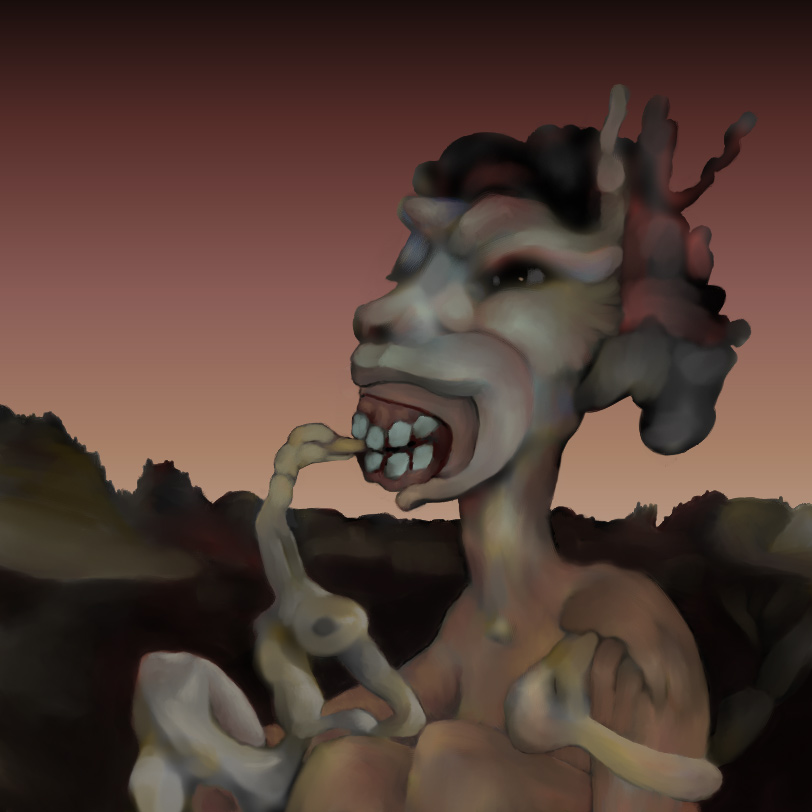
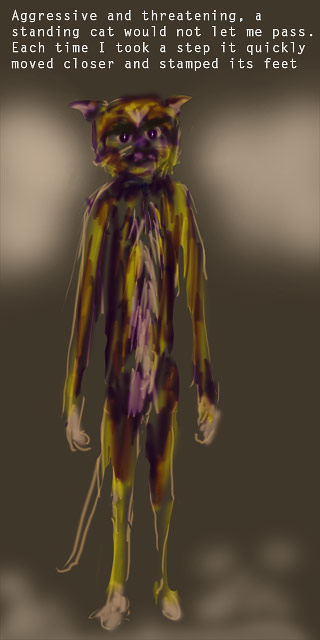
Lil’ Feet is a project I did when I first loaded my new version of the software Painter in May 2011. I wanted to get the feel of the digital brushes and processes again, so I painted it directly and quickly.
No plan, no underlying decalcomania layer, I just quickly applied some digital paint with a few different brushes until I spotted something to develop and before I knew it, this surreal vista was done. Although it was casually and crudely executed, it was sufficient to make me eager to start developing more involved and complex projects, which I have been doing almost daily ever since.
detail: "Decalco Pine Foliage People and Places", June 2011
When I was able to start making marks and images again, I was delighted to realize that this time I was welcoming anything that arose in my mind as I looked at and worked with the random source images… my internal censor is definitely taking a break. For technical explanations of how I make these images, see the previous post.
another detail from : 'Decalco Pine Foliage People and Places'
The words “Decalco Pine Foliage” in the title refer to the random image (a photo of pine boughs) used as inspiration for this piece.
The following detail showcases a caricature of William Burroughs that arrived by surprise in the painting:
detail: "Decalco Pine Foliage" (William Burroughs Pays a Visit)
The completed painting is presented below:
"Decalco Pine Foliage People and Places", June 2011
A few more works from this series will be posted soon. Then I plan to dive into creating more digital decalco. It is SO much fun to use these tools and processes.
I have a already prepared some sound and sound generator posts that are just about ready to offer. They will be filling this space while I am busy working with digital decalcomania.
The term decalcomania refers to the transfer of a crazed image from one surface to another as used in faux furniture and other decorative techniques, and by surrealist painters, such as Max Ernst, who used the crazed surfaces to excite their imaginations.
I refer to my process as digital decalcomania because traditional decalcomania was the process I used for more than 20 years when I could still work with media such as acrylics and oils. The digital process I am using now is very similar: allowing random textures to excite my imagination, giving form to what I see, while retaining as much of the essence of the original random texture as possible.
In those days, I would cover canvases large and small with liquid decalcomania, stare at the results sometimes for hours, even days, until I decided which of the many images I was seeing would be locked in. I am doing the same thing now only with pixels instead of pigments.
The word decalcomania, as I am using it here, refers to the entire process of making a creative response to a found texture, in any medium, by using the found textures to excite the imagination resulting in the creation of new and hopefully surprising images.
Here is the random source image I prepared to use as inspiration for the digital painting “Faces.” By carefully comparing it to the finished version of “Faces” below, you can see some shapes and figures in the finished version that are almost exactly as they appeared in the source image, while others have been enhanced to varying degrees, and some are entirely new.
Source Image for the painting "Faces"
Below is the completed digital decalcomania painting titled “Faces.” It was one of the first projects in the recent series and was completed in July, 2011.
"Faces:" The first digital decalcomania project, completed in July, 2011.
When I finished the grayscale drawing phase of this project, done in a separate layer directly above the prepared random image, I added color “glazes” in separate layers to liven up the composition. I printed it to see how it looked off the computer monitor and immediately disliked the color version. I then added an additional overall “glaze” layer consisting of a very transparent yellow ochre. Now it had the mood I was looking for.
Preparing Digital Decalcomania Images
Below is an overview of the techniques and tools I use to create the digital decalcomania source images in my process. Topics include:
Random Textures with Photoshop Filters
Creating Variety and Surprises with Liquify and Masking
Blending Modes and Edit > Transform
Grayscale vs. Color
Painter Tools
Creation is Destruction – Locking in a Likeness
I start by creating a New Image in Photoshop setting the resolution, usually to 300 or 360, and set the document or print dimensions large enough to be able to make big prints without pixelation. I like knowing that I will have the option later to print hard copies of my images even if I mainly view them on computer monitors. Converting old color photos into black and white is another way I have started digital decalcomania projects.
Random Textures with Photoshop Filters
I begin by using various Photoshop filters such as:
Filter > Render > Difference Clouds
Filter > Pixelate > Crystallize
Filter > Blur > Gaussian Blur (softens hard edges of the random imagery, when needed)
Filter > Liquify (there is a vast world of possibilities with this amazing tool)
Filter > Noise > Add Noise
There are many, many other amazing filters and effects built into Photoshop as well as some great third party effects. The above list presents the filters I have worked with in this recent bunch of digital drawings and paintings and so far are the main tools I use to achieve random textures.
Creating Variety and Surprises with Liquify and Masking
It is fun to play with any image in Photoshop’s Liquify filter. It is like watching a surreal, psychedelic movie. I like the way it disturbs the overall sameness that some of the other filters can create in an image.
Masking sections of a random image before applying a filter makes it possible to restrict the effect of a filter to specific areas of the image instead of an overall application. Liquify includes masking possibilities within its own set of tools.
I use the above filters on new empty layers or in existing images and photos. Sometimes I just quickly slop some black and white marks on a new layer to get things started.
Blending Modes, Opacities, and Edit >Transform
I sometimes copy a layer of randomness that I like, put it above an existing layer, then play with Photoshop’s Layer Blending Modes and Opacities. I will then flatten the image and start to destroy it again in Edit > Transform by flipping layers, or portions of layers, vertically and horizontally then adjusting the blending modes and opacities until something neat happens.
Grayscale vs. Color
I use black and white or grayscale images most of the time knowing that I can add color later. The visual hallucinating that is part of the decalcomania process seems to work best for me with black, white and gray (or with a full range of values of a single dark color). Colors tend to create mental labels and thereby can limit the interpretation of an image fragment. When there is only one color in all its values or just the black-to-white range of values, my mind has an easier time seeing things in the random textures and patterns.
I keep messing around, trying not to think very much until I have a rich, but random image of darks and lights, and a variety of textures and shapes. Sometimes I am tempted to stop at this stage of the process with the final result being abstract – no hallucinated figures, no identified objects, or named symbols – just texture, form, rhythm, pattern, and possibly color. However, my restless mind always spots something in the random image and once I start giving form to it I do not stop until the entire surface has been activated, touched, modified, and integrated. For me, in the struggle between abstraction and figurative, the figurative approach almost always wins out.
I have also used similar sequences of filters, etc. on photos that I have taken of random textures such as stains, old linoleum, flaking and chipped paint, torn weathered signage, and other random surfaces.
Painter Tools
The final images of faces and body parts and other recognizable structures were all created in Painter primarily by using its “Just Add Water” brush and various “Airbrushes.” I also love Painter’s “Blender Stump” brushes. The “Just Add Water” and “Blender Stump” brushes are amazing for pushing pixels around and softly mushing them into each other as if the pixels were made of wet paint or soft pastels.
Creation is Destruction – Locking In a Likeness
Picasso once said something like: Every act of creation is an act of destruction. In my experience this is especially true when working in the decalcomania process. The hardest part of this process for me is in deciding what to destroy in order to create a form that I can be fairly sure my viewers will see as I see it.
My next few posts will feature other completed digital decalcomania paintings with very little related technical information.
Using yesterday’s post as an example, I thought it might be useful to show how I respond to a random image of textures (and in this case colors), how that image provides me with visual ideas that are then modified and developed in the final image, and how other visual information is radically changed or even completely eliminated in the process.
Leda: A progression from inspiration to completion.
Left: the original digital decalcomania source image.
Middle: a composite of the original and finished images.
Right: the finished image.
The process is just like looking for faces in the clouds.
In May 2011, having only whetted my appetite by doing those quick Photoshop drawings, I was delighted when I was able to open up my new purchase of Corel Painter and begin tapping into its virtual brushes and techniques.
Created in Photoshop, this was the digital decalcomania source for the Leda Painting
For my very first project, I started by creating an image in Photoshop of random colors and textures knowing that I would later use it as a hallucination field to inspire the finished digital painting. I opened it in Painter, saved it as .RIF (Painter’s proprietary file format) and started pushing the color around.
Very quickly I spotted the central figure’s face and torso and some duck-like heads. If you turn your head to the right while looking at this source image, you will quickly spot the Leda figure. By adapting for digital processes the method I had worked with for over 30 years (see my description of this process: “Not Just Fixed Likenesses of the Named World: WHY I MAKE IMAGES THAT ARE AS ELUSIVE AS THE SHAPES AND SWIRLS OF SWIFTLY MOVING WATER.”), I let the painting take on a life of its own. I locked in some of the imagery it was suggesting to me, then applied a few finishing touches to make it feel like a complete composition.
This image was created by responding to visual information in the digital decalcomania source image shown above.
More digital decalcomania projects completed using Painter to be posted soon.
In April 2011, I discovered how to once again draw and paint (albeit digitally) despite my physical limitations. I had no idea that I would stop work on this blog and dive into an orgy of image-making, but that is what happened. What follows is a report on how it happened and what resulted.
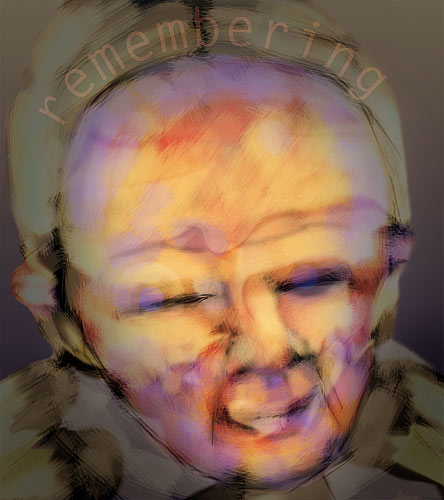
I had missed the ability to draw and paint for several years and spent a lot of time remembering what it used to feel like.
Remembering How It Feels to Draw: The first drawing I made in the adaptive workstation using Photoshop.
Having been unable to stand or sit for more than a few minutes for the past several years my drawing and painting days seemed to be over. Because I have to spend almost all my waking hours in a recliner, drawing and painting other than quick scribbles is very difficult to do. One afternoon while exploring my iPad, I discovered almost by accident that I could still in fact make images while lying on my back. I decided to adapt my main computer workstation to make it possible for me to digitally draw and paint on a larger scale.
An Adaptive Workstation
I rigged up an old Wacom graphics tablet in a stable position on a hospital over-bed table. While stretched out in my recliner, I can easily roll the table and tablet into a position near my drawing hand. My drawing arm is supported by the recliner arm while I stare up at my monitor, which is tilted down at me from an articulated wall-mount. This rig changed my life. All of a sudden I could draw again.
I broke the ice with some quick Photoshop images:
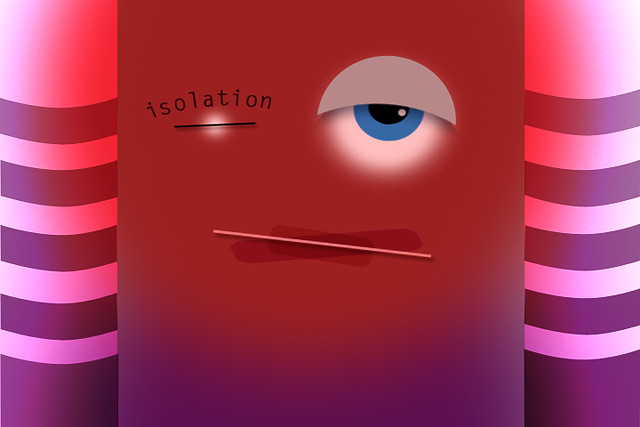
I no longer felt isolated now that I could draw and paint again.
Now I wanted the greater expressive freedom I knew would be possible using Corel Painter. I ordered it and a week later completely dove into digital drawing, spending almost every waking hour making images. In my next post I will present a few of the Painter images I have made in the past 9 months.
In 1967, on one of my almost daily beachcombing walks at Agate Beach near Bolinas, California, I found a piece of very weathered, scarred, and pitted black plastic pipe about 12 feet long. The inside diameter was approximately 3 inches and the wall of the pipe was about 1/2″ thick. The pipe was rather heavy and had a very slight curve to it.
Listening to the Om Generator, Bolinas, CA, 1968
The amazing thing about this piece of pipe was the sound it produced when an observer picked it up and stuck his or her ear in one end of the pipe. It was the same old shell-to-the-ear effect we all discovered as children, but on a huge scale. The pipe seemed to take whatever the local ambient sounds happened to be at the time and combined them into a unique mix and variation of a wonderfully low-pitched OMMMMMMM sound.
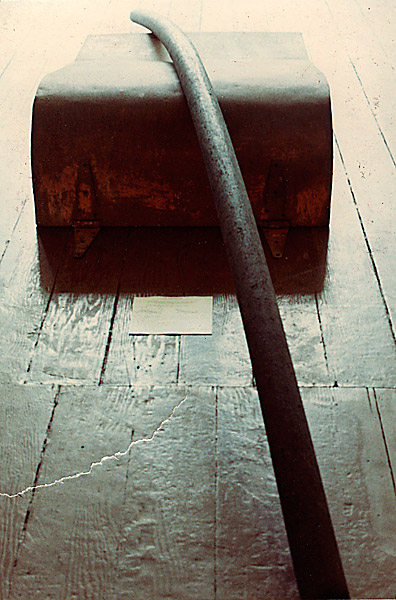
Listening to it with eyes closed was a very soothing and relaxing experience. I included it in one of my solo exhibits at the Unicorn Gallery in San Francisco, in 1968 I think. It was positioned atop a large rusty metal object I had also found at the beach. I placed the two objects right in the middle of the gallery floor. Next to this assemblage I put a large card with printed instructions on how to best use the device.
The Om Generator displayed at the Unicorn Gallery, San Francisco, 1968
The sound created by the Om Generator in the gallery on Fillmore was very different from the sound it made on the mesa in Bolinas. The sound was always different, combining all the ambient sounds, spinning them around inside the pipe and converting them into the Om. In my mind, it revealed the Om that is ever-present in any environment.
Ben Van Meter and I recorded the Om Generator one windy day by sticking one end of the pipe out the window of Ben’s studio in downtown Bolinas then putting a microphone in the other end. That sound is used in much of the soundtrack of boc ging, the 16mm film Ben and I made in 1968.
Here is 38 seconds of 1968 Bolinas wind as processed by the Om Generator:
Discovery
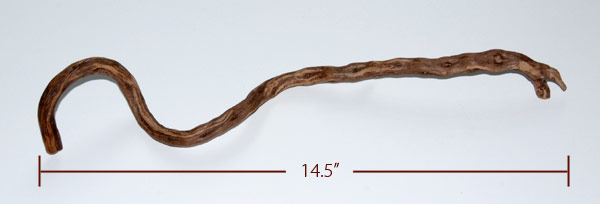
In the mid-1980’s, I went on an all day field trip with several dozen students and a few fellow teachers to the Oakland Museum. During a break I was walking in the gardens of the Museum chatting with some of my students, when one bent down and picked up an unusually shaped twig that was lying on the path. She handed it to me and said: “Bob, this looks like something you could use.”
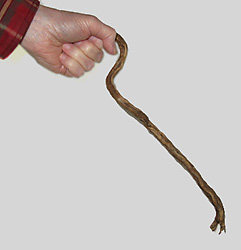
The twig that inspired The Hummer.
I looked at it from all sides and began to mindlessly play with it as we continued our walk. I quickly found that it was very easy to twirl the twig while holding onto the short hook-like end that had grown at almost a right angle to the rest of the twig.
Holding the "Proto-Hummer" is not easy. Its handle is too short.
I absent-mindedly twirled that twig for most of the rest of the day. It was easy, addicting, and the quiet whisper it made as it twirled was intriguing.
When I got home late that night, I kept playing with the twig and noticed how the sound it produced grew louder the faster I twirled it. I started to think about ways to make the sound easier to produce and louder. I suddenly found myself recalling a faint but very fond childhood memory of a simple toy that I had played with in the mid-1940s. It consisted of a small rectangular stiff card with a long string attached to it. The card had small pieces of light wood glued onto two of its edges. A rubber band was stretched around the two pieces of wood. When I swung the string around my head the rubber band would start to make a sound.
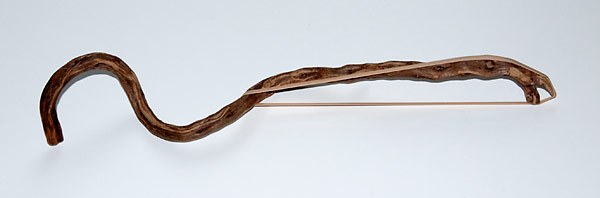
That memory quickly led to the addition of a rubber band to the twig. Twirling the twig now generated a very pleasant, even though still rather quiet, humming sound.
The "Proto-Hummer" with rubber band in place. Note that the right end of the top length of rubber band will hit against the twig when the rubber band vibrates. This muffles the sound. Also the twig is partially blocking airflow behind the top length of rubber band. These limitations, plus the difficult-to-hold handle led to more experiments and improvements.
I observed that more rapid twirling generated a louder sound. I also noticed that rapid twirling heated up my hand from the friction of the spinning twig and that maintaining my grip was very difficult at faster speeds . It became obvious that a handle which could reduce the friction and provide a better grip would be a big help.
The hollow Hummer handle makes it easy to twirl The Hummer for hours.
Balance
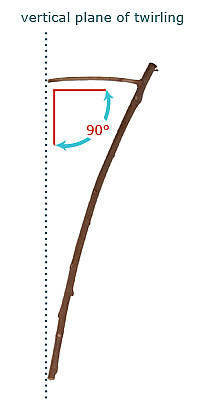
The angle of the Hummer handle in relation to the plane of twirling is critical.
I set the found twig aside and proceeded to construct a Hummer from scratch. I thought that a long dowel with a handle at a right angle should do the trick. Even though the friction problem had been fixed, this version was still awkward to twirl. It took several failed attempts including a lot of broken hummers and the exploration of several variations of the design to recognize what was wrong: the handle did need to be at a right angle, but not a right angle to the hummer shaft, it needed to be at a right angle to the plane of twirling!
Now the Hummer looked like a long skinny triangle. The balance was great. It took much less energy to twirl for long periods of time and it was now possible to have very long twirling sessions without fatigue. This design positions the twirler’s hand and the weighted end of the Hummer directly in line with each other.
Besides the improved action, this alignment reduces the stress at the spot where the handle and shaft meet – the very spot where earlier versions often broke.
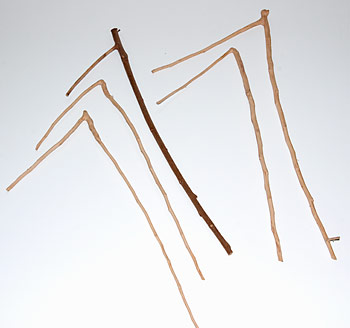
Once I felt I had found the correct design I started collecting sturdy twigs that had naturally grown in the desired configuration. Ever since then I keep an eye out for Hummer frames whenever I am doing any pruning. The raw hummers below came from birch and plum trees in my yard.
A selection of found and partially prepared birch and plum twigs ready to become Hummers.
Rubber Band Alignment, Airflow and Tuning
It was apparent that rubber bands yielded the richest tones when they were taut, without any twists, and aligned so that the thin side faced directly into the wind allowing the air to pass over and under as the Hummer twirled.
By experimenting with a variety of supports to help stretch and align the rubberband, I discovered that it is possible to stretch the rubberband in such a way as to create the potential for two different pitches and at the same time separate the two sections of rubberband and position them for maximum airflow.
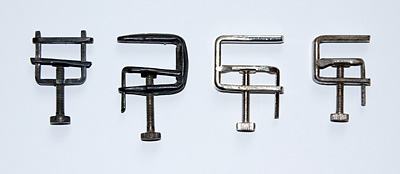
I first tried using wooden pegs to separate the two sides of a stretched rubberband, but these did not create a wide enough gap and could not be easily repositioned. I tried a variety of metal screws and brackets. Then one day when I was looking around my workshop I came across a jar full of Hoffman Hose Clamps. (Note: These are available from chemistry lab equipment suppliers.)
Hoffman Hose Clamps
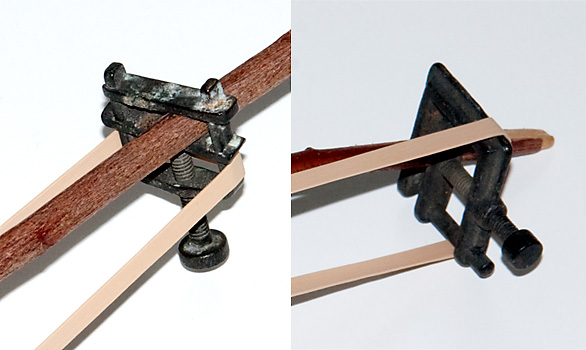
Creating two distinct pitches is accomplished by making one length of the rubber band tighter than the other when stretching it around the clamp.
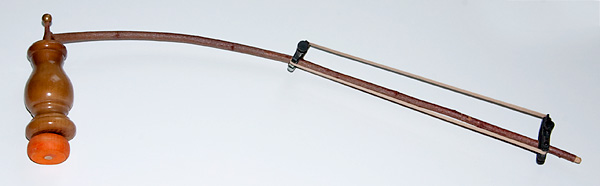
Two chemistry hose clamps provide support for the rubber band and facilitate tuning.
These clamps turned out to be a great solution: they provide a way to position the two sections of rubber band so that neither one is directly in front of the Hummer shaft allowing the air to flow freely over each part piece of the rubber band. In addition, the clamps are easy to re-position on the Hummer shaft by simply loosening the clamp and sliding it to a preferred spot, and they provide a bit of weight that helps to make the twirling easier and steadier.
A Hoffman clamp separates the rubber band to create good airflow.
Tunings
I use all of the following:
both sides tuned to the same pitch (this precludes the de-tuning effect).
one side tuned a minor third or a fifth above the other side.
one side tuned to five semi-tones below the other side.
random: just quickly stretch the rubberband around the clamps and listen.
De-tuning and Listening
Even a well-tuned rubber band will begin to loosen and become de-tuned during long twirling sessions. It is usually the tighter section of rubber band that loosens and becomes gradually lower in pitch. As the two sides of the rubber band move towards the same pitch, the overtones begin to change. This makes for some of the most fun Hummer listening. You can hear some of this happening in the audio sample below.
Maintenance
After a few hours of use, rubber bands age and lose a lot of their elasticity becoming too stretched out to be tuned and, in the process, become too quiet. Changing rubber bands is therefore necessary every few hours of twirling to keep a nice range of overtones to maintain a nice bright sound. The sounds are especially sweet when a new rubber band is used for the first time.
Miscellaneous Tips
I have had best luck so far with #73 size rubber bands available in most office supply stores. I buy them by the boxful.
To keep the Hummer handle from squeaking, I slip some candle wax shavings into the hollow handle.
I always slip the rubber band off the clamps when the Hummer is not in use.
Decoration
I have experimented with decorating Hummers, including wrapping the shafts with colored yarn or using painted handles and end-weights as well as using a variety of found objects to serve as weights and/or handles. This can sometimes generate interesting rings of color as the Hummer is twirled, but the sound is so much more powerful than any visual effect that I no longer worry about how a Hummer looks – only about how easy it is to use and how it sounds. Anyway, my eyes are usually closed while twirling the better to concentrate on the humming.
Using the Hummer
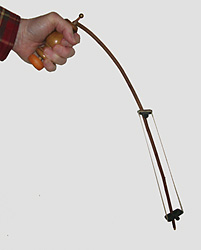
Holding The Hummer - ready for twirling
One of my favorite ways to use the Hummer involves twirling while studying a painting or sculpture that is in progress (or any other project I happen to be working on that is in need of some pondering). I used a Hummer for countless hours during the 3 to 4 years when I was painting the four triptychs in NFMOA. As I looked at my paintings and listened to the droning going on and on, and on and on, I would often feel myself slipping ever-so-slightly into a state of timelessness and could focus my attention on the ever-changing harmonics in the Hummer’s sound.
The other application of Hummer twirling I especially enjoy is to use it in an active chakra meditation. I consciously select a direction to face. This makes me mindful of magnetic North and the spinning of our planet as a background to and context for the twirling Hummer. I usually face North. I begin twirling the Hummer in front of my chest so its circles are parallel to my body with a vertical plane-of-twirl. Once I have established a nice steady pace, I lower the twirling until the center of the twirling, the handle, is directly in front of my first or lowest chakra and I twirl for a while focusing on the harmonics in the Hummer’s sound. At spontaneous intervals I slowly reposition the Hummer until it is in front of the next chakra working my way up until I eventually am twirling the Hummer over the top of my head.
This exercise directs and maintains my awareness and focus on the center of the twirling as well as on the twirling itself and the sounds it makes.
The final twirling position, above my head, produces an intense stereo effect, a kind of Doppler effect as the Hummer passes close to one ear and quickly fades then passes close to the other ear and quickly fades all in rapid succession. Over and over and over…
Twirling Techniques
In the twirling meditation described above, the biggest challenge is keeping the plane of twirling perpendicular to the floor, parallel to one’s torso, then ending with it over the head with the twirling plane parallel to one’s shoulders. Another challenge is learning how to keep a steady tempo. This becomes essential as the twirling grows increasingly difficult due to arm fatigue. One method I developed to deal with these challenges is to switch hands mid-twirl causing as little change in the tempo or overtones as possible. The longer one focuses on the droning hum and the fluctuations in the overtones and change in pitch arising from the loss of tuning and rubber band fatigue the more amazing the experience of listening becomes. The Hummer is truly a great and simple sound toy.
The audio example below begins with each of the two lengths of rubberband being plucked to demonstrate how the Hummer was tuned at the time. The pitches sound very close to D-2 and G#(Ab) seven semitones below. The D is especially complex and is combined with several D# harmonics. As the twirling picks up speed you can hear the D glide into a strong D#(Eb). (Note: the pitch references are just my best guesses at parts of two very complex sounds.)
Listen to The Hummer:
The relationship of of the handle axis to the plane of twirl is key to a balanced and easy to use Hummer.
Trial and Error
Many versions and variations were tested before finally arriving at the optimum size and functionality. In one disastrous experiment I installed a large weight at the end of a 3-foot long Hummer. This one had a very large library-sized rubber band and generated a wonderful deep tone, but it took a lot of muscle power to keep it twirling for long periods of time. On one occasion, in mid-twirl, the weight flew off the end and the Hummer suddenly snapped in two. That was the end of that particular avenue of investigation. Bigger was not better.
Another example of learning the hard way had to do with developing the proper Hummer twirling technique. I quickly discovered the importance of paying attention and staying focused especially when twirling the Hummer around my head. On one such occasion I became absorbed in listening to the Hummer’s sound when the end of the Hummer, at full speed, smacked me in the back of my head. After that, I became much more alert and aware of exactly how and where the Hummer was positioned at all times. This reduced the number of head-smackings, but did not completely eliminate them. Every once in a while when I let my attention drift just a bit… WHAM!
After much trial, and sometimes painful error, I arrived at the current optimal form. It is strong, light-weight, easy to use, and nicely balanced making it possible to twirl for very long periods of time.
If you make your own Hummers or know of any other hummer designs, please let me know. I would love to see photos and will be glad to post them here.
I have spent more time in my life making images than doing any other activity. Playing with sound comes in a close second.
Here is an image I made.
Cottage Cheese Man, ink on paper, WN Folio #175.
The above drawing is from my series titled White Noise (WN). WN was the name I gave to a drawing discipline that I practiced from 1969 to 1976. Initially it was an exercise to help me draw honestly without contrivance or preconception. To do this, I employed a method I referred to as Draw-So-Fast-I-Can’t-Think. I did exactly that and I discarded every drawing as soon as I finished it. A couple years later I made drawings using the same mindset, but I kept every drawing I made. Much more about this method and the resulting drawings will be presented here in the future.
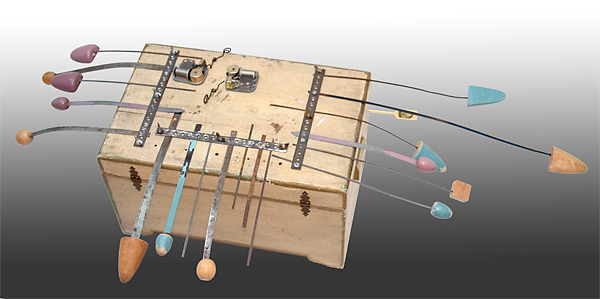
Similar to the African Kalimba, the Bolinas Sound Toy (BST), shown here without mics attached, produces a wonderful polyrhythmic array of twanging, clicking, and ticking sounds by simply pressing down then quickly releasing one or more of its twangers at a time. The shorter ones make sounds that are closer together in time and die out more quickly. The longer ones play much more slowly and include lower pitches in their complex percussive sounds. In addition, the BST has two wind-up musicbox motors for some melodic spice. Dimensions (measuring the longest twangers): 39″wide x 18″deep x 10″high.
The twangers are varying lengths of spring steel collected over many decades in city streets. Found where they fell when they broke off of large, spinning, mechanical street sweeper brushes. The wider twangers are from old shoe stays found in garage sales and thrift stores. Most twangers have a wood weight on their exposed end. This makes playing the instrument easier on the fingers and alters the rate of the twanging. A rough tuning is possible by varying the length of the twangers when clamping them in place.
The BST itself is a playful exploration of one aspect of the much more complex original Bolinas Instrument made in 1968 and featured in the 16mm film Boc Ging from the same year.
Recording
To record the sounds of the BST, I attach two contact mics to the surface of the wooden chest that serves as the body and sounding chamber of the instrument. These are connected via 1/4″ mono plugs to a stereo mini disk recorder. Placing the BST on a resonating surface such as a wooden table can add a lot to the sound.
WAV Files
I use SoundForge to slice the resulting BST .wav files into short samples featuring one or more twangers. Next I create drum racks in Ableton Live, which I load up with those samples of the twangers, then I might add some effects and play around a bit at sequencing the sounds.
The following audio file is the result of just such an exploration with Ableton Live and the BST:
3 Minutes of the BST for the Blog, (03:12, 5.8MB)
Sound-Collages & Time
Not being a musician, I refer to the end products of my experiments as sound-collages and approach the whole process as sculpture rather than composing. I treat sounds like found objects then I proceed to build assemblages with them. Only these assemblages are for listening to as opposed to being observed in space.
Both forms (sound-collages and sculptural assemblages) involve time when they are being experienced by viewers or audiences. Sound-collages are usually of a finite length of time and can only be experienced in time. Sculptural assemblages require the viewer to spend time as s/he observes the work and especially if s/he has to walk around it in order to see the entire piece. The time it takes to see all of a sculptural work is part of that work even if the viewer chooses not to walk around it or is unable to because it is in a corner of a room or hanging on a wall or is in a photograph. The viewer unconsciously senses that element of time.
When my attention is directed to focus on time, I feel more alive.






 bobcomings.com